Wednesday, April 22, 2009

How Split Blogger Header Into Two Sections

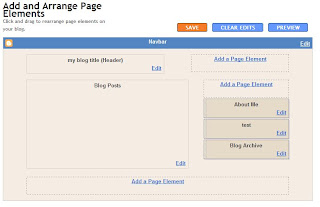
How Split Blogger header Into Two different Sections,ya as you have seen header section on left side in blogger layout and and one section in right side where you can add your add banners.Now i will show you how you can split your blogs header into two widgets like the following screenshot.


First i recommend you backup your template or use a test blog for this example I'm going to use the Minima Template so if you are using a different template the code would be different. The default width of the template header-wrapper code is 660px
(if you don't know what I'm talking about see screenshot below)


So I'm going to set the width of the main header section to 350px and float it to the left see screenshot


Now that's done we can create the second section for the right widget so copy the following code


#header2 {
float:right;
width:250px;
}


And paste it some where in between the opening and closing skin tags like done below


Now copy the following code for the new section


<b:section class='header' id='header2' maxwidgets='1' showaddelement='yes'/>


And paste it like in below image,You can Click the below image to see the codes large and clear if not properly visible.


Now save it and go to the page element tab you should have a new section on the right side of the header here's a screenshot of my result


Credits:-lawnydesigns

How Split Blogger Header Into Two Sections

How Split Blogger header Into Two different Sections,ya as you have seen header section on left side in blogger layout and and one section in right side where you can add your add banners.Now i will show you how you can split your blogs header into two widgets like the following screenshot.


First i recommend you backup your template or use a test blog for this example I'm going to use the Minima Template so if you are using a different template the code would be different. The default width of the template header-wrapper code is 660px
(if you don't know what I'm talking about see screenshot below)


So I'm going to set the width of the main header section to 350px and float it to the left see screenshot


Now that's done we can create the second section for the right widget so copy the following code


#header2 {
float:right;
width:250px;
}


And paste it some where in between the opening and closing skin tags like done below


Now copy the following code for the new section


<b:section class='header' id='header2' maxwidgets='1' showaddelement='yes'/>


And paste it like in below image,You can Click the below image to see the codes large and clear if not properly visible.


Now save it and go to the page element tab you should have a new section on the right side of the header here's a screenshot of my result


Credits:-lawnydesigns

How Split Blogger Header Into Two Sections

How Split Blogger header Into Two different Sections,ya as you have seen header section on left side in blogger layout and and one section in right side where you can add your add banners.Now i will show you how you can split your blogs header into two widgets like the following screenshot.


First i recommend you backup your template or use a test blog for this example I'm going to use the Minima Template so if you are using a different template the code would be different. The default width of the template header-wrapper code is 660px
(if you don't know what I'm talking about see screenshot below)


So I'm going to set the width of the main header section to 350px and float it to the left see screenshot


Now that's done we can create the second section for the right widget so copy the following code


#header2 {
float:right;
width:250px;
}


And paste it some where in between the opening and closing skin tags like done below


Now copy the following code for the new section


<b:section class='header' id='header2' maxwidgets='1' showaddelement='yes'/>


And paste it like in below image,You can Click the below image to see the codes large and clear if not properly visible.


Now save it and go to the page element tab you should have a new section on the right side of the header here's a screenshot of my result


Credits:-lawnydesigns

Numbered Page Navigation Hack For Blogger

Numbered page Navigation widget is very beautiful widget used by bloggers. As you know i have posted this widget in my blog posts with different designs as of before.And today i am going to post a best beautiful design of this page navigation widget.But the css layout of widget works different for some blogs and for some it don't.So i am sorry for you if it doesn't work in your blog it may not work 100 percent sure for you and if it work enjoy it.Below is how the widget looks.



For working demo of the widget you can check my earn money blog.

This design credits totally goes to rias of techieblogger as this hack and design has been given by him.

If you want to see other 2 designs of the widget you can check them from here Design 1 ansd Design 2

Follow below steps how to install it :-

Login To Your Blogger And Then Click On Settings And Navigate To Layout Section.

Then Click On Edit/Html.

Now Find for ]]></b:skin> tag and place below codes before it.


.showpageArea {
padding : 10px;
color : #003366;
text-align : left;
width : 530px;
}
.showpageArea a {
float : left;
background : url(http://img2.pict.com/96/d6/a0/560d85d87b7c3fea73e4f41131/y4c23/backbutton.gif) no-repeat 0 0;
text-align : center;
width : 127px;
height : 42px;
text-align : center;
display : block;
margin : 0 5px;
color : #333;
padding-top : 6px;
}
.showpageArea a:hover {
color : #333;
margin : 0 5px;
padding-top : 6px;
}
.showpageNum a {
background : url(http://img2.pict.com/56/25/a3/e5bd7a9aee1773cf20cd242307/UUzOf/pagenum.gif) no-repeat 0 0;
width : 37px;
height : 42px;
display : block;
text-align : center;
float : left;
margin : 0 5px;
padding-top : 6px;
text-decoration : none;
color : #333;
}
.showpageNum a:hover {
background : url(http://img2.pict.com/fb/78/73/0fd48455927b7543953f6f1637/KG3bY/pagenum.gif) no-repeat 0 100%;
color : #fff;
}
.showpagePoint {
background : url(http://img2.pict.com/fb/78/73/0fd48455927b7543953f6f1637/KG3bY/pagenum.gif) no-repeat 0 100%;
width : 37px;
height : 42px;
display : block;
float : left;
text-align : center;
margin : 0 5px;
padding-top : 6px;
font-weight : bold;
color : #fff;
}
.showpageNum a:link, .showpage a:link {
text-decoration : none;
color : #cc0000;
}


Now search for </body> and place the below codes before it.


<script style='text/javascript'>
var pageCount=5;
var displayPageNum=2;
var upPageWord=&quot;Previous&quot;;
var downPageWord=&quot;Next&quot;;
</script>
<script type='text/javascript'>
//<![CDATA[
var home_page_url=location.href;function showpageCount(json){var thisUrl=home_page_url;var htmlMap=new Array();var thisNum=1;var postNum=1;var itemCount=0;var fFlag=0;var eFlag=0;var html='';var upPageHtml='';var downPageHtml='';for(var i=0,post;post=json.feed.entry[i];i++){var timestamp1=post.published.$t.substring(0,19)+post.published.$t.substring(23,29);timestamp=encodeURIComponent(timestamp1);var title=post.title.$t;if(title!=''){if(itemCount==0||(itemCount%pageCount==(pageCount-1))){if(thisUrl.indexOf(timestamp)!=-1){thisNum=postNum}if(title!='')postNum++;htmlMap[htmlMap.length]='/search?updated-max='+timestamp+'&max-results='+pageCount}}itemCount++}for(var p=0;p<htmlMap.length;p++){if(p>=(thisNum-displayPageNum-1)&&p<(thisNum+displayPageNum)){if(fFlag==0&&p==thisNum-2){if(thisNum==2){upPageHtml='<span class="showpage"><a href="/">'+upPageWord+'</a></span>'}else{upPageHtml='<span class="showpage"><a href="'+htmlMap[p]+'">'+upPageWord+'</a></span>'}fFlag++}if(p==(thisNum-1)){html+='<span class="showpagePoint">'+thisNum+'</span>'}else{if(p==0){html+='<span class="showpageNum"><a href="/">1</a></span>'}else{html+='<span class="showpageNum"><a href="'+htmlMap[p]+'">'+(p+1)+'</a></span>'}}if(eFlag==0&&p==thisNum){downPageHtml='<span class="showpage"> <a href="'+htmlMap[p]+'">'+downPageWord+'</a></span>';eFlag++}}}if(thisNum>1){html=''+upPageHtml+' '+html+' '}html='<div class="showpageArea"><span style="COLOR: #000;" class="showpageOf"> Pages ('+(postNum-1)+')</span>'+html;if(thisNum<(postNum-1)){html+=downPageHtml}if(postNum==1)postNum++;html+='</div>';var pageArea=document.getElementsByName("pageArea");var blogPager=document.getElementById("blog-pager");if(postNum<=2){html=''}for(var p=0;p<pageArea.length;p++){pageArea[p].innerHTML=html}if(pageArea&&pageArea.length>0){html=''}if(blogPager){blogPager.innerHTML=html}}function showpageCount2(json){var thisUrl=home_page_url;var htmlMap=new Array();var isLablePage=thisUrl.indexOf("/search/label/")!=-1;var thisLable=isLablePage?thisUrl.substr(thisUrl.indexOf("/search/label/")+14,thisUrl.length):"";thisLable=thisLable.indexOf("?")!=-1?thisLable.substr(0,thisLable.indexOf("?")):thisLable;var thisNum=1;var postNum=1;var itemCount=0;var fFlag=0;var eFlag=0;var html='';var upPageHtml='';var downPageHtml='';var labelHtml='<span class="showpageNum"><a href="/search/label/'+thisLable+'?&max-results='+pageCount+'">';var thisUrl=home_page_url;for(var i=0,post;post=json.feed.entry[i];i++){var timestamp1=post.published.$t.substring(0,19)+post.published.$t.substring(23,29);timestamp=encodeURIComponent(timestamp1);var title=post.title.$t;if(title!=''){if(itemCount==0||(itemCount%pageCount==(pageCount-1))){if(thisUrl.indexOf(timestamp)!=-1){thisNum=postNum}if(title!='')postNum++;htmlMap[htmlMap.length]='/search/label/'+thisLable+'?updated-max='+timestamp+'&max-results='+pageCount}}itemCount++}for(var p=0;p<htmlMap.length;p++){if(p>=(thisNum-displayPageNum-1)&&p<(thisNum+displayPageNum)){if(fFlag==0&&p==thisNum-2){if(thisNum==2){upPageHtml=labelHtml+upPageWord+'</a></span>'}else{upPageHtml='<span class="showpage"><a href="'+htmlMap[p]+'">'+upPageWord+'</a></span>'}fFlag++}if(p==(thisNum-1)){html+='<span class="showpagePoint">'+thisNum+'</span>'}else{if(p==0){html=labelHtml+'1</a></span>'}else{html+='<span class="showpageNum"><a href="'+htmlMap[p]+'">'+(p+1)+'</a></span>'}}if(eFlag==0&&p==thisNum){downPageHtml='<span class="showpage"> <a href="'+htmlMap[p]+'">'+downPageWord+'</a></span>';eFlag++}}}if(thisNum>1){if(!isLablePage){html=''+upPageHtml+' '+html+' '}else{html=''+upPageHtml+' '+html+' '}}html='<div class="showpageArea"><span style="COLOR: #000;" class="showpageOf"> Pages ('+(postNum-1)+')</span>'+html;if(thisNum<(postNum-1)){html+=downPageHtml}if(postNum==1)postNum++;html+='</div>';var pageArea=document.getElementsByName("pageArea");var blogPager=document.getElementById("blog-pager");if(postNum<=2){html=''}for(var p=0;p<pageArea.length;p++){pageArea[p].innerHTML=html}if(pageArea&&pageArea.length>0){html=''}if(blogPager){blogPager.innerHTML=html}}var thisUrl=home_page_url;if(thisUrl.indexOf("/search/label/")!=-1){if(thisUrl.indexOf("?updated-max")!=-1){var lblname1=thisUrl.substring(thisUrl.indexOf("/search/label/")+14,thisUrl.indexOf("?updated-max"))}else{var lblname1=thisUrl.substring(thisUrl.indexOf("/search/label/")+14,thisUrl.indexOf("?&max"))}}var home_page="/";if(thisUrl.indexOf("?q=")==-1&&thisUrl.indexOf(".html")==-1){if(thisUrl.indexOf("/search/label/")==-1){document.write('<script src="'+home_page+'feeds/posts/summary?alt=json-in-script&callback=showpageCount&max-results=99999" ><\/script>')}else{document.write('<script src="'+home_page+'feeds/posts/full/-/'+lblname1+'?alt=json-in-script&callback=showpageCount2&max-results=99999" ><\/script>')}}
//]]>
</script>


In the above code you can find the below written word and can change its value from 5 to any you want.

1 : var pageCount=5;

*where 5 is the the number of post that apppear in another page you will visit.

2: var displayPageNum=2;

*This code determines the number of additional page navigation numbers that will be displayed on the page.

I hope you will like this widget for sure.And i promise next time will give more beautiful design myself to you as due to lack of time not able to post frequently.Best of Luck !!

Numbered Page Navigation Hack For Blogger

Numbered page Navigation widget is very beautiful widget used by bloggers. As you know i have posted this widget in my blog posts with different designs as of before.And today i am going to post a best beautiful design of this page navigation widget.But the css layout of widget works different for some blogs and for some it don't.So i am sorry for you if it doesn't work in your blog it may not work 100 percent sure for you and if it work enjoy it.Below is how the widget looks.


For working demo of the widget you can check my earn money blog.

This design credits totally goes to rias of techieblogger as this hack and design has been given by him.

If you want to see other 2 designs of the widget you can check them from here Design 1 ansd Design 2

Follow below steps how to install it :-

Login To Your Blogger And Then Click On Settings And Navigate To Layout Section.

Then Click On Edit/Html.

Now Find for ]]></b:skin> tag and place below codes before it.


.showpageArea {
padding : 10px;
color : #003366;
text-align : left;
width : 530px;
}
.showpageArea a {
float : left;
background : url(http://img2.pict.com/96/d6/a0/560d85d87b7c3fea73e4f41131/y4c23/backbutton.gif) no-repeat 0 0;
text-align : center;
width : 127px;
height : 42px;
text-align : center;
display : block;
margin : 0 5px;
color : #333;
padding-top : 6px;
}
.showpageArea a:hover {
color : #333;
margin : 0 5px;
padding-top : 6px;
}
.showpageNum a {
background : url(http://img2.pict.com/56/25/a3/e5bd7a9aee1773cf20cd242307/UUzOf/pagenum.gif) no-repeat 0 0;
width : 37px;
height : 42px;
display : block;
text-align : center;
float : left;
margin : 0 5px;
padding-top : 6px;
text-decoration : none;
color : #333;
}
.showpageNum a:hover {
background : url(http://img2.pict.com/fb/78/73/0fd48455927b7543953f6f1637/KG3bY/pagenum.gif) no-repeat 0 100%;
color : #fff;
}
.showpagePoint {
background : url(http://img2.pict.com/fb/78/73/0fd48455927b7543953f6f1637/KG3bY/pagenum.gif) no-repeat 0 100%;
width : 37px;
height : 42px;
display : block;
float : left;
text-align : center;
margin : 0 5px;
padding-top : 6px;
font-weight : bold;
color : #fff;
}
.showpageNum a:link, .showpage a:link {
text-decoration : none;
color : #cc0000;
}


Now search for </body> and place the below codes before it.


<script style='text/javascript'>
var pageCount=5;
var displayPageNum=2;
var upPageWord=&quot;Previous&quot;;
var downPageWord=&quot;Next&quot;;
</script>
<script type='text/javascript'>
//<![CDATA[
var home_page_url=location.href;function showpageCount(json){var thisUrl=home_page_url;var htmlMap=new Array();var thisNum=1;var postNum=1;var itemCount=0;var fFlag=0;var eFlag=0;var html='';var upPageHtml='';var downPageHtml='';for(var i=0,post;post=json.feed.entry[i];i++){var timestamp1=post.published.$t.substring(0,19)+post.published.$t.substring(23,29);timestamp=encodeURIComponent(timestamp1);var title=post.title.$t;if(title!=''){if(itemCount==0||(itemCount%pageCount==(pageCount-1))){if(thisUrl.indexOf(timestamp)!=-1){thisNum=postNum}if(title!='')postNum++;htmlMap[htmlMap.length]='/search?updated-max='+timestamp+'&max-results='+pageCount}}itemCount++}for(var p=0;p<htmlMap.length;p++){if(p>=(thisNum-displayPageNum-1)&&p<(thisNum+displayPageNum)){if(fFlag==0&&p==thisNum-2){if(thisNum==2){upPageHtml='<span class="showpage"><a href="/">'+upPageWord+'</a></span>'}else{upPageHtml='<span class="showpage"><a href="'+htmlMap[p]+'">'+upPageWord+'</a></span>'}fFlag++}if(p==(thisNum-1)){html+='<span class="showpagePoint">'+thisNum+'</span>'}else{if(p==0){html+='<span class="showpageNum"><a href="/">1</a></span>'}else{html+='<span class="showpageNum"><a href="'+htmlMap[p]+'">'+(p+1)+'</a></span>'}}if(eFlag==0&&p==thisNum){downPageHtml='<span class="showpage"> <a href="'+htmlMap[p]+'">'+downPageWord+'</a></span>';eFlag++}}}if(thisNum>1){html=''+upPageHtml+' '+html+' '}html='<div class="showpageArea"><span style="COLOR: #000;" class="showpageOf"> Pages ('+(postNum-1)+')</span>'+html;if(thisNum<(postNum-1)){html+=downPageHtml}if(postNum==1)postNum++;html+='</div>';var pageArea=document.getElementsByName("pageArea");var blogPager=document.getElementById("blog-pager");if(postNum<=2){html=''}for(var p=0;p<pageArea.length;p++){pageArea[p].innerHTML=html}if(pageArea&&pageArea.length>0){html=''}if(blogPager){blogPager.innerHTML=html}}function showpageCount2(json){var thisUrl=home_page_url;var htmlMap=new Array();var isLablePage=thisUrl.indexOf("/search/label/")!=-1;var thisLable=isLablePage?thisUrl.substr(thisUrl.indexOf("/search/label/")+14,thisUrl.length):"";thisLable=thisLable.indexOf("?")!=-1?thisLable.substr(0,thisLable.indexOf("?")):thisLable;var thisNum=1;var postNum=1;var itemCount=0;var fFlag=0;var eFlag=0;var html='';var upPageHtml='';var downPageHtml='';var labelHtml='<span class="showpageNum"><a href="/search/label/'+thisLable+'?&max-results='+pageCount+'">';var thisUrl=home_page_url;for(var i=0,post;post=json.feed.entry[i];i++){var timestamp1=post.published.$t.substring(0,19)+post.published.$t.substring(23,29);timestamp=encodeURIComponent(timestamp1);var title=post.title.$t;if(title!=''){if(itemCount==0||(itemCount%pageCount==(pageCount-1))){if(thisUrl.indexOf(timestamp)!=-1){thisNum=postNum}if(title!='')postNum++;htmlMap[htmlMap.length]='/search/label/'+thisLable+'?updated-max='+timestamp+'&max-results='+pageCount}}itemCount++}for(var p=0;p<htmlMap.length;p++){if(p>=(thisNum-displayPageNum-1)&&p<(thisNum+displayPageNum)){if(fFlag==0&&p==thisNum-2){if(thisNum==2){upPageHtml=labelHtml+upPageWord+'</a></span>'}else{upPageHtml='<span class="showpage"><a href="'+htmlMap[p]+'">'+upPageWord+'</a></span>'}fFlag++}if(p==(thisNum-1)){html+='<span class="showpagePoint">'+thisNum+'</span>'}else{if(p==0){html=labelHtml+'1</a></span>'}else{html+='<span class="showpageNum"><a href="'+htmlMap[p]+'">'+(p+1)+'</a></span>'}}if(eFlag==0&&p==thisNum){downPageHtml='<span class="showpage"> <a href="'+htmlMap[p]+'">'+downPageWord+'</a></span>';eFlag++}}}if(thisNum>1){if(!isLablePage){html=''+upPageHtml+' '+html+' '}else{html=''+upPageHtml+' '+html+' '}}html='<div class="showpageArea"><span style="COLOR: #000;" class="showpageOf"> Pages ('+(postNum-1)+')</span>'+html;if(thisNum<(postNum-1)){html+=downPageHtml}if(postNum==1)postNum++;html+='</div>';var pageArea=document.getElementsByName("pageArea");var blogPager=document.getElementById("blog-pager");if(postNum<=2){html=''}for(var p=0;p<pageArea.length;p++){pageArea[p].innerHTML=html}if(pageArea&&pageArea.length>0){html=''}if(blogPager){blogPager.innerHTML=html}}var thisUrl=home_page_url;if(thisUrl.indexOf("/search/label/")!=-1){if(thisUrl.indexOf("?updated-max")!=-1){var lblname1=thisUrl.substring(thisUrl.indexOf("/search/label/")+14,thisUrl.indexOf("?updated-max"))}else{var lblname1=thisUrl.substring(thisUrl.indexOf("/search/label/")+14,thisUrl.indexOf("?&max"))}}var home_page="/";if(thisUrl.indexOf("?q=")==-1&&thisUrl.indexOf(".html")==-1){if(thisUrl.indexOf("/search/label/")==-1){document.write('<script src="'+home_page+'feeds/posts/summary?alt=json-in-script&callback=showpageCount&max-results=99999" ><\/script>')}else{document.write('<script src="'+home_page+'feeds/posts/full/-/'+lblname1+'?alt=json-in-script&callback=showpageCount2&max-results=99999" ><\/script>')}}
//]]>
</script>


In the above code you can find the below written word and can change its value from 5 to any you want.

1 : var pageCount=5;

*where 5 is the the number of post that apppear in another page you will visit.

2: var displayPageNum=2;

*This code determines the number of additional page navigation numbers that will be displayed on the page.

I hope you will like this widget for sure.And i promise next time will give more beautiful design myself to you as due to lack of time not able to post frequently.Best of Luck !!

Numbered Page Navigation Hack For Blogger

Numbered page Navigation widget is very beautiful widget used by bloggers. As you know i have posted this widget in my blog posts with different designs as of before.And today i am going to post a best beautiful design of this page navigation widget.But the css layout of widget works different for some blogs and for some it don't.So i am sorry for you if it doesn't work in your blog it may not work 100 percent sure for you and if it work enjoy it.Below is how the widget looks.


For working demo of the widget you can check my earn money blog.

This design credits totally goes to rias of techieblogger as this hack and design has been given by him.

If you want to see other 2 designs of the widget you can check them from here Design 1 ansd Design 2

Follow below steps how to install it :-

Login To Your Blogger And Then Click On Settings And Navigate To Layout Section.

Then Click On Edit/Html.

Now Find for ]]></b:skin> tag and place below codes before it.


.showpageArea {
padding : 10px;
color : #003366;
text-align : left;
width : 530px;
}
.showpageArea a {
float : left;
background : url(http://img2.pict.com/96/d6/a0/560d85d87b7c3fea73e4f41131/y4c23/backbutton.gif) no-repeat 0 0;
text-align : center;
width : 127px;
height : 42px;
text-align : center;
display : block;
margin : 0 5px;
color : #333;
padding-top : 6px;
}
.showpageArea a:hover {
color : #333;
margin : 0 5px;
padding-top : 6px;
}
.showpageNum a {
background : url(http://img2.pict.com/56/25/a3/e5bd7a9aee1773cf20cd242307/UUzOf/pagenum.gif) no-repeat 0 0;
width : 37px;
height : 42px;
display : block;
text-align : center;
float : left;
margin : 0 5px;
padding-top : 6px;
text-decoration : none;
color : #333;
}
.showpageNum a:hover {
background : url(http://img2.pict.com/fb/78/73/0fd48455927b7543953f6f1637/KG3bY/pagenum.gif) no-repeat 0 100%;
color : #fff;
}
.showpagePoint {
background : url(http://img2.pict.com/fb/78/73/0fd48455927b7543953f6f1637/KG3bY/pagenum.gif) no-repeat 0 100%;
width : 37px;
height : 42px;
display : block;
float : left;
text-align : center;
margin : 0 5px;
padding-top : 6px;
font-weight : bold;
color : #fff;
}
.showpageNum a:link, .showpage a:link {
text-decoration : none;
color : #cc0000;
}


Now search for </body> and place the below codes before it.


<script style='text/javascript'>
var pageCount=5;
var displayPageNum=2;
var upPageWord=&quot;Previous&quot;;
var downPageWord=&quot;Next&quot;;
</script>
<script type='text/javascript'>
//<![CDATA[
var home_page_url=location.href;function showpageCount(json){var thisUrl=home_page_url;var htmlMap=new Array();var thisNum=1;var postNum=1;var itemCount=0;var fFlag=0;var eFlag=0;var html='';var upPageHtml='';var downPageHtml='';for(var i=0,post;post=json.feed.entry[i];i++){var timestamp1=post.published.$t.substring(0,19)+post.published.$t.substring(23,29);timestamp=encodeURIComponent(timestamp1);var title=post.title.$t;if(title!=''){if(itemCount==0||(itemCount%pageCount==(pageCount-1))){if(thisUrl.indexOf(timestamp)!=-1){thisNum=postNum}if(title!='')postNum++;htmlMap[htmlMap.length]='/search?updated-max='+timestamp+'&max-results='+pageCount}}itemCount++}for(var p=0;p<htmlMap.length;p++){if(p>=(thisNum-displayPageNum-1)&&p<(thisNum+displayPageNum)){if(fFlag==0&&p==thisNum-2){if(thisNum==2){upPageHtml='<span class="showpage"><a href="/">'+upPageWord+'</a></span>'}else{upPageHtml='<span class="showpage"><a href="'+htmlMap[p]+'">'+upPageWord+'</a></span>'}fFlag++}if(p==(thisNum-1)){html+='<span class="showpagePoint">'+thisNum+'</span>'}else{if(p==0){html+='<span class="showpageNum"><a href="/">1</a></span>'}else{html+='<span class="showpageNum"><a href="'+htmlMap[p]+'">'+(p+1)+'</a></span>'}}if(eFlag==0&&p==thisNum){downPageHtml='<span class="showpage"> <a href="'+htmlMap[p]+'">'+downPageWord+'</a></span>';eFlag++}}}if(thisNum>1){html=''+upPageHtml+' '+html+' '}html='<div class="showpageArea"><span style="COLOR: #000;" class="showpageOf"> Pages ('+(postNum-1)+')</span>'+html;if(thisNum<(postNum-1)){html+=downPageHtml}if(postNum==1)postNum++;html+='</div>';var pageArea=document.getElementsByName("pageArea");var blogPager=document.getElementById("blog-pager");if(postNum<=2){html=''}for(var p=0;p<pageArea.length;p++){pageArea[p].innerHTML=html}if(pageArea&&pageArea.length>0){html=''}if(blogPager){blogPager.innerHTML=html}}function showpageCount2(json){var thisUrl=home_page_url;var htmlMap=new Array();var isLablePage=thisUrl.indexOf("/search/label/")!=-1;var thisLable=isLablePage?thisUrl.substr(thisUrl.indexOf("/search/label/")+14,thisUrl.length):"";thisLable=thisLable.indexOf("?")!=-1?thisLable.substr(0,thisLable.indexOf("?")):thisLable;var thisNum=1;var postNum=1;var itemCount=0;var fFlag=0;var eFlag=0;var html='';var upPageHtml='';var downPageHtml='';var labelHtml='<span class="showpageNum"><a href="/search/label/'+thisLable+'?&max-results='+pageCount+'">';var thisUrl=home_page_url;for(var i=0,post;post=json.feed.entry[i];i++){var timestamp1=post.published.$t.substring(0,19)+post.published.$t.substring(23,29);timestamp=encodeURIComponent(timestamp1);var title=post.title.$t;if(title!=''){if(itemCount==0||(itemCount%pageCount==(pageCount-1))){if(thisUrl.indexOf(timestamp)!=-1){thisNum=postNum}if(title!='')postNum++;htmlMap[htmlMap.length]='/search/label/'+thisLable+'?updated-max='+timestamp+'&max-results='+pageCount}}itemCount++}for(var p=0;p<htmlMap.length;p++){if(p>=(thisNum-displayPageNum-1)&&p<(thisNum+displayPageNum)){if(fFlag==0&&p==thisNum-2){if(thisNum==2){upPageHtml=labelHtml+upPageWord+'</a></span>'}else{upPageHtml='<span class="showpage"><a href="'+htmlMap[p]+'">'+upPageWord+'</a></span>'}fFlag++}if(p==(thisNum-1)){html+='<span class="showpagePoint">'+thisNum+'</span>'}else{if(p==0){html=labelHtml+'1</a></span>'}else{html+='<span class="showpageNum"><a href="'+htmlMap[p]+'">'+(p+1)+'</a></span>'}}if(eFlag==0&&p==thisNum){downPageHtml='<span class="showpage"> <a href="'+htmlMap[p]+'">'+downPageWord+'</a></span>';eFlag++}}}if(thisNum>1){if(!isLablePage){html=''+upPageHtml+' '+html+' '}else{html=''+upPageHtml+' '+html+' '}}html='<div class="showpageArea"><span style="COLOR: #000;" class="showpageOf"> Pages ('+(postNum-1)+')</span>'+html;if(thisNum<(postNum-1)){html+=downPageHtml}if(postNum==1)postNum++;html+='</div>';var pageArea=document.getElementsByName("pageArea");var blogPager=document.getElementById("blog-pager");if(postNum<=2){html=''}for(var p=0;p<pageArea.length;p++){pageArea[p].innerHTML=html}if(pageArea&&pageArea.length>0){html=''}if(blogPager){blogPager.innerHTML=html}}var thisUrl=home_page_url;if(thisUrl.indexOf("/search/label/")!=-1){if(thisUrl.indexOf("?updated-max")!=-1){var lblname1=thisUrl.substring(thisUrl.indexOf("/search/label/")+14,thisUrl.indexOf("?updated-max"))}else{var lblname1=thisUrl.substring(thisUrl.indexOf("/search/label/")+14,thisUrl.indexOf("?&max"))}}var home_page="/";if(thisUrl.indexOf("?q=")==-1&&thisUrl.indexOf(".html")==-1){if(thisUrl.indexOf("/search/label/")==-1){document.write('<script src="'+home_page+'feeds/posts/summary?alt=json-in-script&callback=showpageCount&max-results=99999" ><\/script>')}else{document.write('<script src="'+home_page+'feeds/posts/full/-/'+lblname1+'?alt=json-in-script&callback=showpageCount2&max-results=99999" ><\/script>')}}
//]]>
</script>


In the above code you can find the below written word and can change its value from 5 to any you want.

1 : var pageCount=5;

*where 5 is the the number of post that apppear in another page you will visit.

2: var displayPageNum=2;

*This code determines the number of additional page navigation numbers that will be displayed on the page.

I hope you will like this widget for sure.And i promise next time will give more beautiful design myself to you as due to lack of time not able to post frequently.Best of Luck !!

Happy Earth Day from New York Couture Wedding Invitation Designer Lela New York